How to Edit AI-Generated Content in Five Checks
 By Dani Furmenek · October 27, 2026
Most advice on editing AI content spends its time on making the writing sound human. I check voice too, but it's the last of five checks.
Here's the order I work in:
- Commitments
- Facts
- A comparison against the brief
- Links and attachments
- Voice
It applies to proposals, client emails, sales pages, and ads as much as to blog posts.
I run a one-person marketing agency, so everything that goes out under my name has to hold up to scrutiny, because my reputation depends on it. I like to build my outlines and first drafts instead of handing AI a blank page, and I treat AI as a collaborator: it helps me research, organize, and pressure-test, and then I go back through the work in round after round of my own edits. That back-and-forth is what turns a generic draft into something I'm comfortable sending to a client.
AI is very good at producing copy that reads well, and that's exactly what makes it risky. A clumsy draft is easy to pick apart, while a polished one slides past you with the mistake still in it. One travel agency owner on Reddit put it this way: Claude "writes polished stuff that often makes no sense operationally".
The checks I run on everything
I run these in order, because the early checks catch the mistakes that cost money and the later ones catch the mistakes that cost style points.
1. Commitments
Read the draft for every promise it makes and hold each one up against your actual offer, proposal, or client agreement. I look for:
- prices, discounts, and payment terms
- deadlines and turnaround times
- what's included and how many rounds of revisions
- results, guarantees, or outcomes ("you'll rank on page one," "double your leads")
- next steps you'd have to deliver ("I'll send the full report tomorrow")
AI fills gaps with confident specifics, so if you didn't give it your real terms, it'll invent reasonable-sounding ones. Even when it's working from your SOP or template, it can still add a deadline or change what's included.
2. Facts
Every name, number, date, link, and claim should match a source you can open, and if I can't find the source quickly, the claim comes out, because the draft will be fine without it.
When I use AI to help with research, I ask it to cite its sources, whether that means a note in my Obsidian vault or a page it found through Google. I open the source and check that it supports the specific claim in my draft, especially when a number or detail sounds like it came from research.
Here's why a citation alone isn't enough. In October 2026, GEO researcher Metehan Yesilyurt, now at Peec AI, wrote up an experiment where he generated 50,000 fake statistics pages in a day with GPT-4.1, for about $50, and never checked a single number.
Google buried the site, but ChatGPT kept pulling from it, and the invented numbers later showed up in an academic paper and a financial group's investment research. He calls that "citation laundering": each new citation makes a fake number look more trustworthy, without making it true. So I trace each number back to the page that first published it.
3. The brief
I rarely see this one recommended, and besides commitments it's the most important. Put the AI-assisted version next to whatever it started from: the client's request, your notes, your original draft, your offer sheet. Then look for three things:
- Added: new claims, new promises, a benefit the client never asked you to mention.
- Dropped: the caveat you included on purpose, the condition attached to a price, the one detail the client cared most about.
- Softened or sharpened: "usually within a week" turning into "within a week," or "can help" turning into "will."
Here's a real one from my own site: my free guide page told readers the download included "two fictional examples," and when I compared that line against the actual download, it had only one.
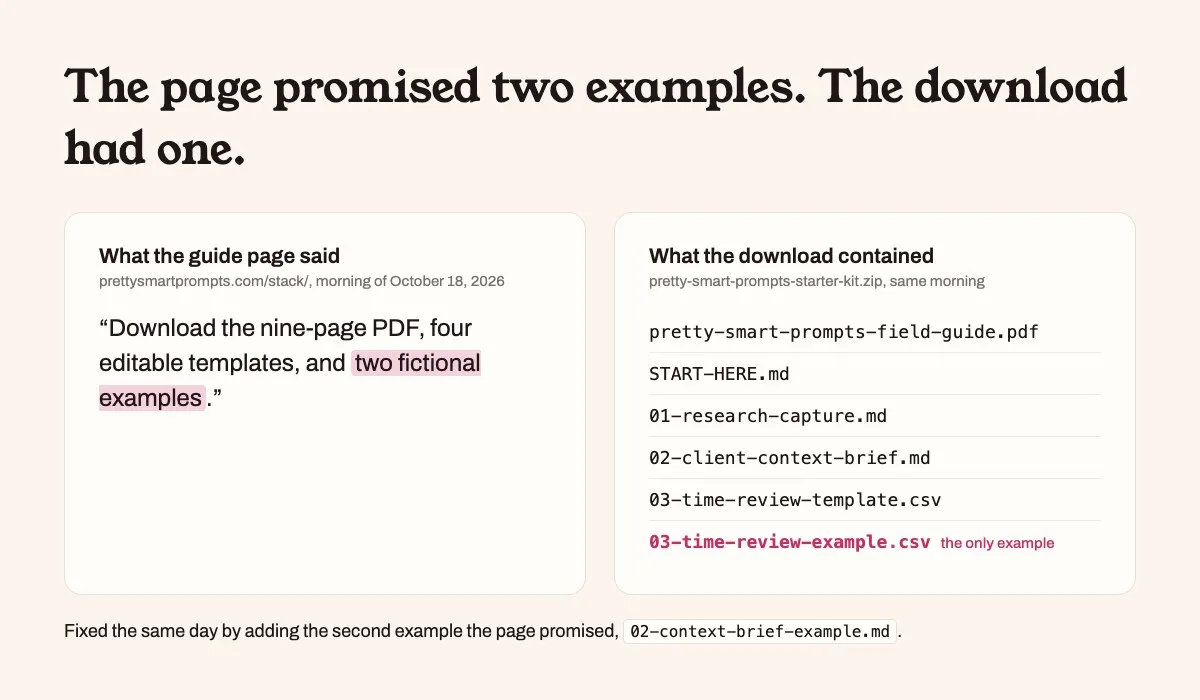
The page had made a promise the deliverable didn't keep, so I fixed it by going back and adding the second example it promised.
When AI edits something I wrote for length or tone, I compare the revised wording with my original and check that the shorter version still says what I meant.
4. Links, attachments, and the basics
Click through every link and attachment, then check the recipient, the version, and the permissions on any shared file. It's boring work, and it's where a perfectly good email goes wrong.
5. Voice, last
Now read it out loud and ask yourself whether you'd say it that way to the person on a call.
Plenty of people would put this check first, and on a one-to-one email this makes sense. One Reddit commenter stopped using AI for client emails because the drafts "sounded too polished and [they] had to rewrite half of it anyway". Sounding like a template can cost goodwill. I still check voice last, because a stiff sentence can be smoothed over in the next email, while a wrong price or deadline has to be honored or walked back.
I keep a list of patterns that make writing sound machine-made and check every draft against it. These are the ones I catch most often:
- The repeated opener: lines in a row that start the same way for rhythm, like "More leads. More calls. More revenue."
- The false contrast: "It's not X. It's not Y. It's Z."
- The rhetorical section opener: starting a section with "So, how does it work?" instead of telling the reader.
- The "imagine" opener: "Imagine waking up to a calendar full of booked calls."
- The drumbeat staccato: three short sentences of the same length in a row.
My guide on making ChatGPT sound less like AI covers the voice brief and banned list that get the first draft close.
Extra checks for client emails
A one-to-one email to a client is where small mistakes feel biggest, because it's personal.
- Check the recipients first. Make sure the To, CC, and BCC lines hold exactly the people who should see it.
- Reread their email before yours. In my drafts, AI tends to answer the general version of a question, so I make sure mine responds to what they actually asked.
- Open the attachment you're sending. Confirm it's the current version and that the file name makes sense to them.
- Cross-check your history with this client. A draft that doesn't know your last three conversations can contradict them.
Extra checks for marketing copy
Anything you're promoting carries rules that a plain reply to a client doesn't.
- Back up every claim, including results. The FTC expects advertising claims to be truthful and supported by evidence before the ad runs, and that applies to small businesses (FTC, Advertising FAQs: A Guide for Small Business). Keep "the best in Boston," "proven to work," and any results claim only if you can prove it.
- Keep testimonials and reviews real. If you quote a customer or describe their results, the FTC's endorsement guidance applies, including disclosing any connection you have to the person (FTC, Endorsements, Influencers, and Reviews). Never let AI write a testimonial.
- Follow CAN-SPAM on every promotional email. It covers commercial email of any size, even a promotion sent to a single client, and it has no exception for business-to-business email. You need an honest subject line, your physical address, and a working way to unsubscribe (FTC, CAN-SPAM Act: A Compliance Guide for Business).
- Test before you send. Send yourself a test to check the links, and use preview mode to check personalization, since Mailchimp's merge tags don't fill in on test emails unless you turn on live merge tag info (Mailchimp, Preview and test your email campaign).
- Publish pages a person would find useful. Google says it's critical to manually fact-check and review AI-generated content before publishing (Google Search Central, Using generative AI content), and its quality raters look at the main content of a page for effort, originality, talent or skill, and accuracy (Google Search Central, Creating helpful content).
What these checks caught this month
I caught all of these while working on this blog and reviewing my own site.
Commitments and the brief: a page promised something the download didn't deliver. This is the "two fictional examples" line from check 3. It appeared on my free guide page, and the download had one example until I added the second.
Voice: I found a pattern I tell AI to avoid in my own site copy. The copy for my free guide page came out of a back-and-forth with an AI agent, and one line read, "That review is part of the workflow, not cleanup after it." That's a false contrast, straight off my own list. During review, I replaced it with "I schedule time for that review as part of the job."
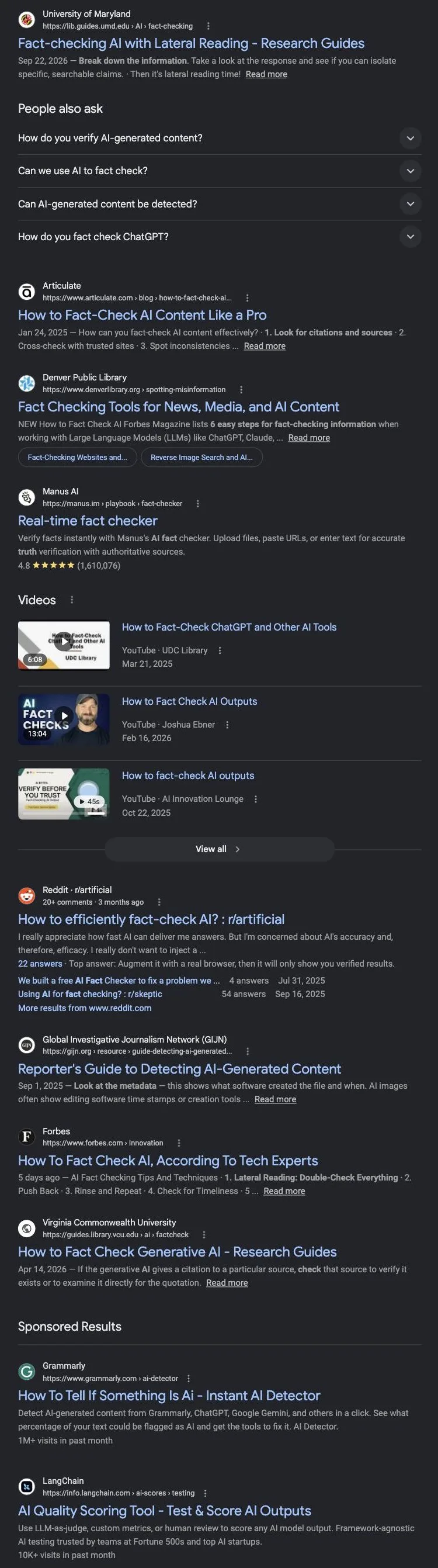
Facts: the research picked the wrong target. AI-assisted keyword research suggested this post target "how to fact check AI content." Before committing, I looked at the live Google results. Most of them were library guides from the University of Maryland, VCU, and the Denver Public Library, along with Forbes, Articulate, and ads for AI detectors.
Google was serving that phrase to students checking whether ChatGPT told them the truth, and my readers are business owners checking work before it goes to a client. I changed the target to "how to edit AI-generated content."
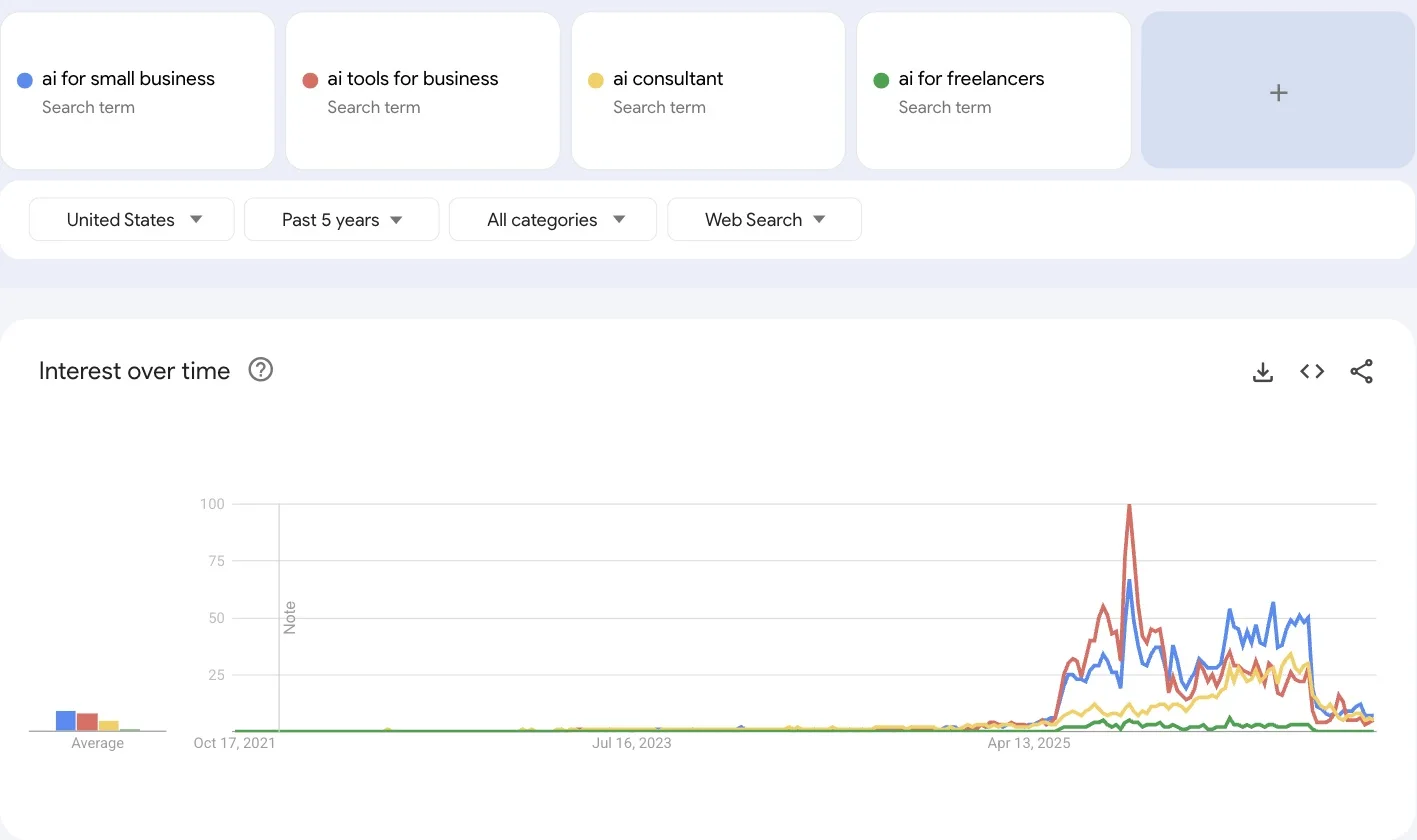
Facts: the research notes gave an explanation I hadn't verified. In the Google Trends charts I saved for this research, several AI and business terms rose and fell during the same weeks. My research notes from Claude labeled that stretch a data problem, but I hadn't verified what caused the change.
That explanation needed checking before I could use it in a post or a client recommendation. I couldn't confirm it, so the chart below appears without it.
Facts: my first idea list overrated a topic. When I first brainstormed posts for this blog, "ChatGPT prompts for business" sat at the top, based on how well those pins perform on Pinterest. Running the topic through the same research I do for clients showed its Google search interest has been near zero since ChatGPT launched, and Pinterest Trends doesn't track ChatGPT prompt terms at all. Strong engagement on one platform didn't mean people were searching for it.
How long this takes
It depends on the deliverable: a proposal takes me about two hours from start to finish, and a web page can take up to a few days (depending on client revisions). I build the review into that time, and on client work it's the part I'd cut last. The checklist itself is short, and the time goes into the rounds of edits around it.
If that sounds slow, compare it with the cost of a proposal that promises a deliverable you didn't price, or an email that commits you to a deadline you can't hit. AI saves me real time on research and organization, some of that time goes straight back into checking, and the trade is still worth it.
Further reading
Karen Spinner makes a similar point about time in her own editing process: AI saves her an hour or so, and expert review can add hours or days. Kevin Indig's four-pass editing workflow is the best structure I've seen for editing AI-written blog content. Neither covers commitments, the brief comparison, or the rules for marketing copy, which is why I wrote this one.
Download the checklist
I keep this as a one-page checklist I run before anything goes out. Download the checklist.
Sources
- Google Search Central, Using generative AI content
- Google Search Central, Creating helpful, reliable, people-first content
- Federal Trade Commission, Advertising FAQs: A Guide for Small Business
- Federal Trade Commission, Endorsements, Influencers, and Reviews
- Federal Trade Commission, CAN-SPAM Act: A Compliance Guide for Business
- Mailchimp, Preview and test your email campaign
Check your next draft for AI writing patterns.
- The full pattern list and a paste-in prompt for ChatGPT or Claude, no install needed
- A Claude Code and Codex skill that runs 21 checks on your draft and rewrites each flagged sentence
- Free on GitHub, with no email signup