How to use AI in your small business.
To use AI in your small business, start with one task you repeat every week, write down how you do it and the facts it needs, and keep AI on that task only if the time saved survives the checking. AI wasted my time until I had those steps written down. Once they were, I finished 5 videos, 4 carousels, 5 video scripts, 11 social posts, and 2 guides in eight days.
- Pick one task you repeat every week.
- Write down how you do it, the facts it needs, and what a good result looks like.
- Run AI on it for a week and time the task from start to finish, including the checking.
- Keep AI on the task only if the time saved survives that check.
- Learn as you go, with free courses from the companies that make the tools.
 By Dani Furmenek · Published October 16, 2026 · Updated November 15, 2026
What does AI look like in a small business that uses it every day?
This is eight days of my own content, November 8 to 15, 2026, counted from my edit logs, my drafts folder, and the site's change history. All of it was in addition to the book of business I manage at my marketing agency.
| What | How many | Examples |
|---|---|---|
| Short-form videos finished | 5 | ChatGPT Business Profile, Microsoft Clarity, Google Maps AI, Google Search Console, a search spike breakdown |
| Carousels finished | 4 | Which Claude model, the AI slop checker, ChatGPT Business Hub, Microsoft Clarity |
| Video scripts written | 5 | Four on ChatGPT business profiles, one on GitHub repos to try |
| Social posts drafted | 11 | A three-part series written for LinkedIn, Threads, and X, plus two Threads posts |
| Carousel hooks written | 80 | Five hooks each for 16 carousels |
| Guides published or refreshed | 2 | How I Trained ChatGPT and Claude on My Business, How to Make ChatGPT Sound Less Like AI |
| Changes to this website | 47 | The homepage, About page, three guides, and a new free downloads page |
Every piece started from written steps, like a brief, a brand kit, or a source guide, and went through my own review before it went out. The rework shows in the version numbers. My ChatGPT Business Profile video took about 23 renders before the final, and by the search spike video it was down to 9, because by then the fixes I'd asked for over and over, like where the screen recording sits over me and how the title card looks, were written down as defaults. The carousels ran to 16 versions for ChatGPT Business Hub and 10 for the AI slop checker.
What AI made on its own, next to what went out
Codex, OpenAI's coding agent, built the first version of my "Which Claude model" carousel from a written model guide.
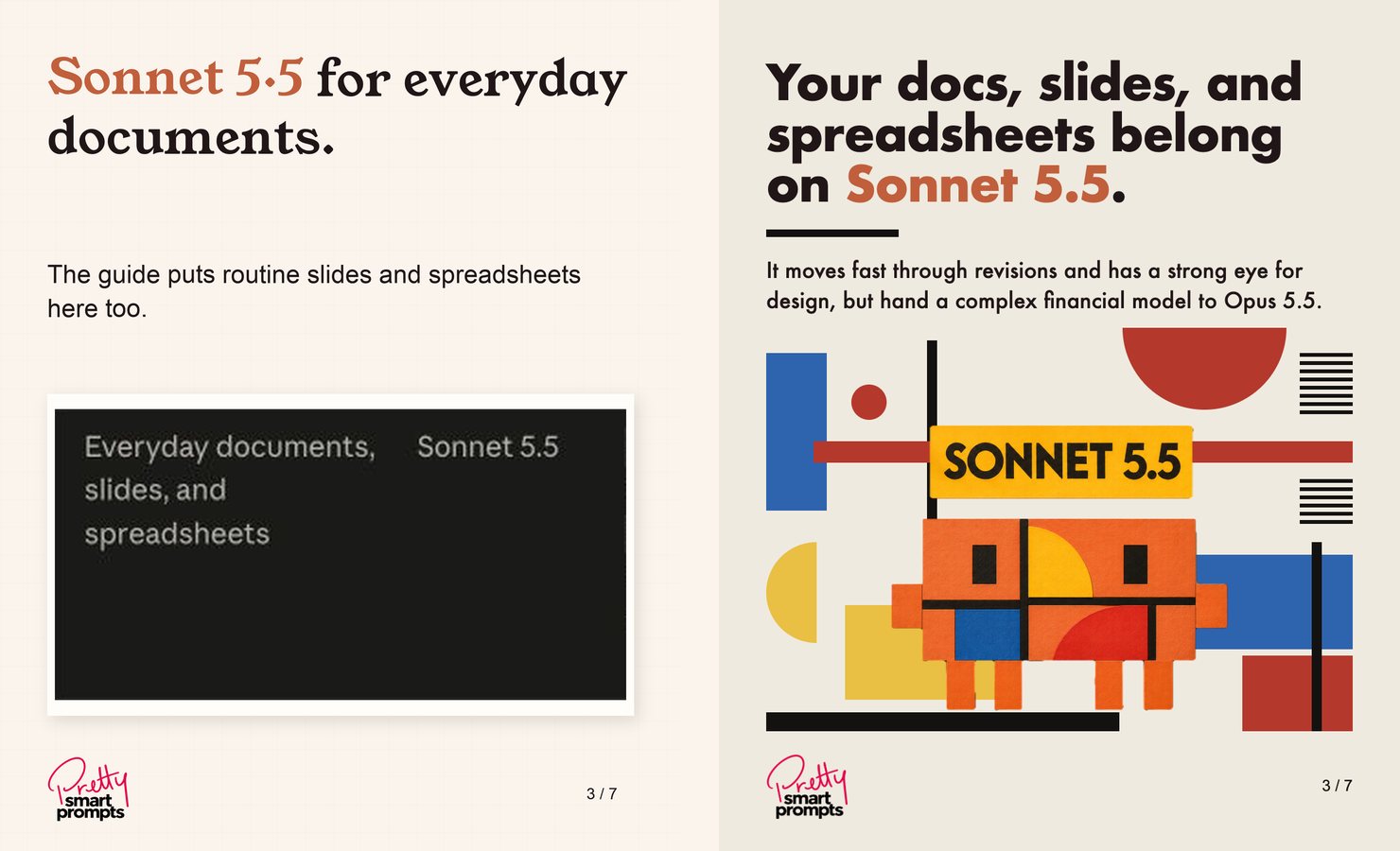
- What Codex madeCropped screenshots of the guide's table, blown up until they blurred, with one model per slide in identical phrasing and body lines that filled space.
- What went outEach Claude model drawn in its own art style, Haiku as minimalism, Sonnet as a Bauhaus poster, Opus as a corkboard collage with a sticky note pinned to it, and Fable as liquid chrome, plus a slide on choosing effort before choosing a model.
The final took seven rounds after Codex's version, each one a note from me, like rebuilding the Sonnet slide after a Bauhaus poster I sent. The art styles and ideas still came from someone who spends a little too much time on the internet (me), while AI handled the production. Even with seven rounds of going back and forth, that has still significantly decreased the time it takes me to produce content.
When doesn't AI save time?
AI hasn't saved me time when I asked it to do something before I'd written down how I do it. My first experiments back in 2023 were emails and website copy. AI skipped the research that makes good SEO and didn't know how I talk, so one ChatGPT email opened with something like "I hope you're doing well in these trying times," a line I would never write. Every draft needed the same corrections, and I'd have thrown my hands up halfway through a week like the one above.
Written steps stop those repeat corrections. The Codex carousel shows what they don't do, which is come up with the idea. The fix is to write down the task once, including the facts the AI can use and what you'd never say, then give the AI that write-up every time. How I Trained ChatGPT and Claude on My Business walks through where to save the write-up, and How to Make ChatGPT Sound Less Like AI covers matching your voice.
Which task should I try first?
Your first task should be one you repeat every week. A task is a good first test when you can explain what goes in, what a good result looks like, and how you'll check it.
- 01Write down three recurring tasks.
Good candidates are first replies to inquiries, meeting summaries, or follow-up emails built from call notes.
- 02Pick the one with clear inputs.
You should already have the email, notes, or source material. Don't start with a task that needs AI to invent missing facts.
- 03Keep the stakes manageable.
You can review a draft reply before sending it. I don't let AI complete anything with real-world consequences, like paying bills, moving money, or buying stocks, and I'd add setting prices, making legal commitments, and deciding who gets hired.
- 04Remove private details.
Paste only the facts the task needs, and leave out private customer details you don't need to share with the tool.
Copy the prompt
Paste this into ChatGPT, Claude, or the AI already in your software, and fill in the brackets.
Copyable prompt
I run a one-person [type of business]. I want help with this recurring task: [describe the task].

Here is the source material I already have: [paste only the relevant facts and remove unnecessary personal details].

Here is what a good result must include: [list the requirements].

Here are two examples of how I have done it before: [paste your examples].

First, tell me what information is missing. Do not guess missing facts. Then draft one result I can review. Mark any uncertain detail as [CHECK]. After the draft, give me a short checklist of what I must verify before using it.
Ask for one draft at a time. Don't build a complicated automation until the manual version proves useful.
How do I know if AI is saving time?
To tell whether AI is saving time, run a one-week test and count the checking.
| Step | What to do |
|---|---|
| Baseline | Time one normal version of the task without AI |
| Trial | Use the prompt above on three real instances, reviewing each result |
| Record | Note total minutes, including writing the prompt, correcting the draft, and checking the result |
| Decision | Keep it if the total beats your baseline. If it doesn't, fix the input, try a saved template instead, or move to another task |
If the total isn't lower, the tool hasn't saved you time yet. Sometimes a saved template does the job without AI at all. How to Edit AI-Generated Content covers the review step in full.
Which AI tool should I pay for?
When you're starting out, the AI tool worth paying for is the $20-a-month plan for Claude, ChatGPT, or both, put to work in Claude Code or Codex. Claude Code helped me build this website and edits my videos, and you don't need to know how to code to get that kind of help, because you'll pick it up quickly as you go.
The AI built into Gmail or Canva stays inside that company's apps. Claude Code and Codex connect to your email, calendar, and files and build tools you keep, like the morning brief that pulls my calendar, inbox, and client notes into one page each morning, and the time tracker that logs my hours by client.
Once you've gotten the hang of things or keep hitting your usage limits, graduate to the $100 plan, Claude Max or ChatGPT Pro.
Where can I learn AI for free?
The fastest way to learn AI is to start by doing. Get your hands dirty on one real task this week, and use these free resources when questions come up.
- Anthropic's coursesAI Fluency for Small Businesses and the rest of Claude Academy cost nothing.
- The Claude developer blogclaude.dev/blog is where I found the guide behind my "Which Claude model" carousel.
- Google's free certificate for U.S. small businessesThe Google AI Professional Certificate is free for verified U.S. small businesses with 500 employees or fewer and an EIN, and it comes with three months of Google AI Pro, if you enroll by December 15, 2026 (checked November 15, 2026). Google AI Essentials is a separate course and costs $49 a month after a 7-day trial.
- YouTubeGoogle's Make AI Work for You video series is free and shows real business owners using the tools. It's linked from the same Grow with Google small business page.
Check each result during your test week.
- A one-page checklist for unapproved promises, unsourced facts, and broken links
- Extra checks for client emails and marketing copy
- Free PDF, with no email signup
Sources
- My edit logs, carousel finals, script files, and the site's git history, November 8 to 15, 2026
- My round-by-round revision record of the "Which Claude model" carousel, November 14 to 15, 2026
- "Which Claude model should you build with?", Addy Osmani, claude.dev, November 9, 2026
- Anthropic, AI Fluency for Small Businesses and Claude Academy, checked November 15, 2026
- Grow with Google, AI for Small Businesses and Google AI Essentials, checked November 15, 2026
- Claude pricing and ChatGPT pricing, checked November 15, 2026